EN
MS SQL Server - UPDATE query with FETCH
0
points

In this article, we would like to show you UPDATE query with FETCH in MS SQL Server.
Practical example
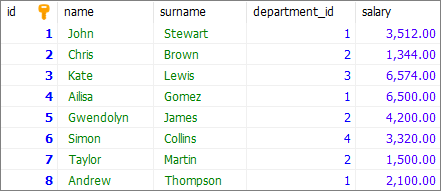
To show you UPDATE query with FETCH, we will use the following users table:
Note:
At the end of this article you can find database preparation SQL queries.
Example
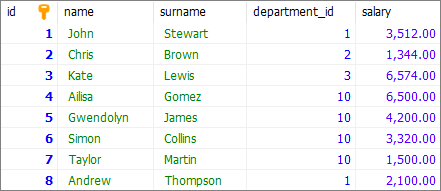
In this example, we will update department_id column value for users from id value 3 (excluding user with id = 3). We will also limit the update to 4 users.
Query:
UPDATE [users] SET [department_id]= 10
WHERE [id] IN (
    SELECT [id] FROM (
        SELECT [id] FROM [users]
        ORDER BY [id]
		OFFSET 3 ROWS
		FETCH NEXT 4 ROWS ONLY
    ) subquery
);
Result:
Database preparation
create_tables.sql file:
CREATE TABLE [users] (
	[id] INT IDENTITY(1,1),
	[name] VARCHAR(50) NOT NULL,
	[surname] VARCHAR(50) NOT NULL,
	[department_id] INT,
    [salary] DECIMAL(15,2) NOT NULL,
	PRIMARY KEY ([id])
);
insert_data.sql file:
INSERT INTO [users]
	( [name], [surname], [department_id], [salary])
VALUES
	('John', 'Stewart', 1, '3512.00'),
	('Chris', 'Brown', 2, '1344.00'),
	('Kate', 'Lewis', 3, '6574.00'),
	('Ailisa', 'Gomez', 1, '6500.00'),
	('Gwendolyn', 'James', 2, '4200.00'),
	('Simon', 'Collins', 4, '3320.00'),
	('Taylor', 'Martin', 2, '1500.00'),
	('Andrew', 'Thompson', 1, '2100.00');