EN
MySQL - Create or replace view
0
points

In this article, we would like to show you how to create and update a view using CREATE OR REPLACE VIEW in MySQL.
Quick solution:
CREATE OR REPLACE VIEW `view_name` AS
SELECT `column1`, `column2`, `columnN`
FROM `table_name`
WHERE condition;
Practical example
To show how to create or replace a view, we will use the following table:
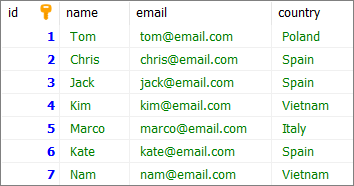
Note:
At the end of this article you can find database preparation SQL queries.
Example 1 - create view
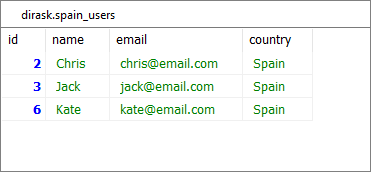
In this example, we will create a view using CREATE OR REPLACE VIEW statement.
Query:
CREATE OR REPLACE VIEW `spain_users` AS
SELECT *
FROM `users`
WHERE `country` = 'Spain';
Result:
Example 2 - update view
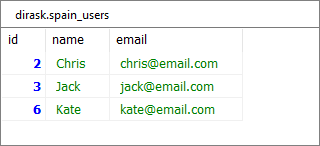
In this example, we will remove the country column from the view created in Example 1. We will remove the column by updating the existing view using CREATE OR REPLACE VIEW statement.
Query:
CREATE OR REPLACE VIEW `spain_users` AS
SELECT `id`, `name`, `email`
FROM `users`
WHERE `country` = 'Spain';
Result:
Database preparation
create_tables.sql file:
CREATE TABLE `users` (
	`id` INT(10) UNSIGNED NOT NULL AUTO_INCREMENT,
	`name` VARCHAR(100) NOT NULL,
	`email` VARCHAR(100) NOT NULL,
	`country` VARCHAR(15) NOT NULL,
	PRIMARY KEY (`id`)
)
ENGINE=InnoDB;
insert_data.sql file:
INSERT INTO `users`
	(`name`, `email`, `country`)
VALUES
	('Tom', 'tom@email.com', 'Poland'),
	('Chris','chris@email.com', 'Spain'),
	('Jack','jack@email.com', 'Spain'),
    ('Kim','kim@email.com', 'Vietnam'),
    ('Marco','marco@email.com', 'Italy'),
	('Kate','kate@email.com', 'Spain'),
	('Nam','nam@email.com', 'Vietnam');
create_view.sql file:
CREATE VIEW `spain_users` AS
SELECT *
FROM `users`
WHERE `country` = 'Spain';