EN
MS SQL Server - Create table with FOREIGN KEY
0
points

In this article, we would like to show you how to create a table with FOREIGN KEY in MS SQL Server.
Quick solution:
CREATE TABLE [table1_name] (
    [column1] DATA_TYPE,
    [column2] DATA_TYPE,
    [columnN] DATA_TYPE,
    PRIMARY KEY ([column_name]),
    FOREIGN KEY ([column_name]) REFERENCES [table2_name]([reference_column])
);
Note:
Go to the official documentation to see available
DATA_TYPES.
Practical example
In this example, we will create two tables:
groupstable with two columns:id- withPRIMARY KEYconstraintgroup_name
and users table with three columns:
id- withPRIMARY KEYconstraintusernamegroup_id- which will be ourFOREIGN KEYwithgroups.idcolumn reference
Query:
CREATE TABLE [groups] (
	[id] INT IDENTITY(1,1),
	[group_name] VARCHAR(50) NOT NULL,
	PRIMARY KEY ([id])
);

CREATE TABLE [users] (
	[id] INT IDENTITY(1,1),
	[username] VARCHAR(50) NOT NULL,
	[group_id] INT,
	PRIMARY KEY ([id]),
	FOREIGN KEY ([group_id]) REFERENCES [groups]([id])
);
Result:
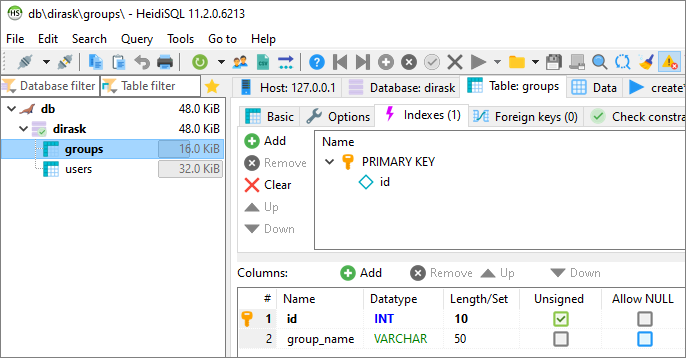
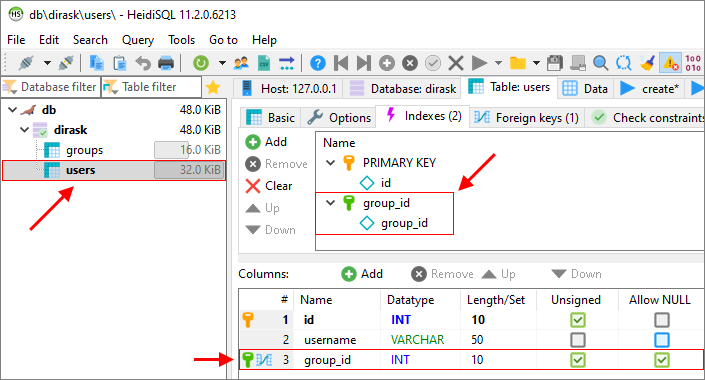
As we see in the second picture, the group_id column from users table has FOREIGN KEY constraint which refers to the id column from groups table with PRIMARY KEY constraint.