EN
C# - program that registers hot keys under Windows (WPF application)
4
points

In this article, we would like to show how to register hot keys in C# WPF application under Windows.
.NET doesn't provide API that lets to handle keys pressed under operating system, so it is necessary to call WinAPI functions.

Practical example
In the solution, the invisible window is created only to be application able to handle the pressed keys in the operating system - some window is needed. In your project you can use HotKeyManager class with other existing application window.
Project structure:
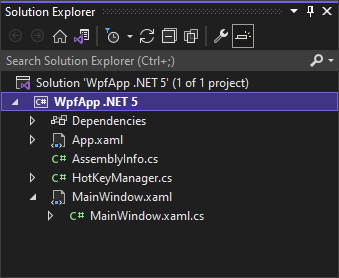
MainWindow.xaml file:
<Window x:Class="Example.MainWindow"
        xmlns="http://schemas.microsoft.com/winfx/2006/xaml/presentation"
        xmlns:x="http://schemas.microsoft.com/winfx/2006/xaml"
        xmlns:d="http://schemas.microsoft.com/expression/blend/2008"
        xmlns:mc="http://schemas.openxmlformats.org/markup-compatibility/2006"
        xmlns:local="clr-namespace:Example"
        mc:Ignorable="d"
        Title="MainWindow"
        Height="0"
        Width="0"
        MaxWidth="0"
        MaxHeight="0"
        WindowStyle="None"
        ResizeMode="NoResize"
        ShowInTaskbar="False"
        Loaded="Window_Loaded"
        Unloaded="Window_Unloaded" />
MainWindow.xaml.cs file:
using System.Windows;

namespace Example
{
    /// <summary>
    /// Interaction logic for MainWindow.xaml
    /// </summary>
    public partial class MainWindow : Window
    {
        private HotKeyManager? _manager;

        public MainWindow()
        {
            this.InitializeComponent();
        }

        private void Window_Loaded(object sender, RoutedEventArgs e)
        {
            this._manager = new HotKeyManager(this);

            this._manager.KeyHandled += this.Manager_KeyHandled;

            this._manager.RegisterHotKey(0x1B, 0x0000);  // Escape         (in dec: 27)
            this._manager.RegisterHotKey(0x20, 0x0002);  // Ctrl + Space   (in dec: 2 and 32)
        }

        private void Window_Unloaded(object sender, RoutedEventArgs e)
        {
            if (this._manager != null)
                this._manager.Dispose();
        }

        private void Manager_KeyHandled(object? sender, HotKeyEventArgs e)
        {
            // you can handle yours cases here by checking e.Key and e.Modifiers

            MessageBox.Show("Key: " + e.Key + "  Modifiers: " + e.Modifiers);
        }
    }
}
HotKeyManager.cs file:
using System;
using System.Collections.Generic;
using System.Runtime.InteropServices;
using System.Windows;
using System.Windows.Interop;

public class HotKeyManager: IDisposable
{
    private int _id = 0;

    private HwndSource _source;
    private HashSet<int> _ids = new HashSet<int>();

    private bool _disposed = false;

    public event EventHandler<HotKeyEventArgs>? KeyHandled;

    public HotKeyManager(Window window)
    {
        this._source = (HwndSource)PresentationSource.FromVisual(window);

        if (this._source == null)
            throw new InvalidOperationException("Window doesn't have created handle yet.");

        this._source.AddHook(this.WndProc);
    }

    ~HotKeyManager()
    {
        this.Dispose(false);
    }

    /// <summary>
    /// Registers hot key.
    /// </summary>
    /// <param name="key">
    ///     registered key code
    ///     Key codes:
    ///       https://docs.microsoft.com/en-us/windows/win32/inputdev/virtual-key-codes
    ///       e.g.
    ///       [Constant]   [Value]  [Description]
    ///        VK_SHIFT     0x10     SHIFT key
    ///        VK_CONTROL   0x11     CTRL key
    ///        VK_MENU      0x12     ALT key
    ///        VK_TAB       0x09     TAB key
    ///        VK_SPACE     0x20     SPACEBAR
    ///        etc.
    /// </param>
    /// <param name="modifiers">
    ///     registered key modifiers (Ctrl, Alt, Shift, etc.)
    ///     Key modifiers:
    ///       https://docs.microsoft.com/en-us/windows/win32/api/winuser/nf-winuser-registerhotkey
    ///       [Constant]     [Value]
    ///        ALT_KEY        0x0001
    ///        CONTROL_KEY    0x0002
    ///        SHIFT_KEY      0x0004
    ///        WIN_KEY        0x0008
    ///        NOREPEAT_KEY   0x4000
    /// </param>
    /// <returns>registered hot key id</returns>
    /// <exception cref="ObjectDisposedException">when ovject was disposed</exception>
    public int RegisterHotKey(uint key, uint modifiers)
    {
        if (this._disposed)
            throw new ObjectDisposedException("Hot key manager has been destroyed.");

        int id = (++this._id);

        if (RegisterHotKey(this._source.Handle, id, modifiers, key))
        {
            this._ids.Add(id);

            return id;
        }

        return -1; // when it is impossible to register hot key/keys
    }

    /// <summary>
    /// Unregisters hot key.
    /// </summary>
    /// <param name="id">registered hot key id</param>
    /// <exception cref="ObjectDisposedException">when object was disposed</exception>
    public void UnregisterHotKey(int id)
    {
        if (this._disposed)
            throw new ObjectDisposedException("Hot key manager has been destroyed.");

        if (UnregisterHotKey(this._source.Handle, id))
            this._ids.Remove(id);
    }

    private IntPtr WndProc(IntPtr hwnd, int msg, IntPtr wParam, IntPtr lParam, ref bool handled)
    {
        handled = false;

        if (msg == 0x312) // WinAPI WM_HOTKEY
        {
            long code = (long) lParam;

            uint key = this.GetKey(code);
            uint modifiers = this.GetModifiers(code);

            this.KeyHandled?.Invoke(this, new HotKeyEventArgs(key, modifiers));
        }

        return IntPtr.Zero;
    }

    private uint GetKey(long code)
    {
        return 0xFFFFu & (uint)(code >> 16);
    }

    private uint GetModifiers(long code)
    {
        return 0xFFFFu & (uint)(code >> 0);
    }

    protected virtual void Dispose(bool disposing)
    {
        if (!this._disposed)
        {
            if (disposing)
            {
                this._source.RemoveHook(this.WndProc);
                this._source.Dispose();
            }

            foreach (int id in this._ids)
                UnregisterHotKey(this._source.Handle, id);

            this._disposed = true;
        }
    }

    public void Dispose()
    {
        this.Dispose(true);

        GC.SuppressFinalize(this);
    }

    [DllImport("user32", SetLastError = true)]
    private static extern bool RegisterHotKey(IntPtr hWnd, int id, uint fsModifiers, uint vk);

    [DllImport("user32", SetLastError = true)]
    private static extern bool UnregisterHotKey(IntPtr hWnd, int id);
}

public class HotKeyEventArgs: EventArgs
{
    public uint Key { get; }
    public uint Modifiers { get; }

    public HotKeyEventArgs(uint key, uint modifiers)
    {
        this.Key = key;
        this.Modifiers = modifiers;
    }
}
See also
References
Alternative titles
- C# - handle keys pressed in Windows (WPF application)
- C# - register hot keys under Windows (WPF application)
- C# - program that adds hot keys in Windows (WPF application)
- C# - monitor pressed operating system keys (WPF application under Windows)
- C# - global keyboard shortcuts under Windows (WPF application under Windows)
- C# - program that registers hotkeys under Windows (WPF application)