EN
Java - resize JPG image (high quality)
7
points

In this short article, we would like to show how to resize image using Java.
The solution presented in the article provides quite good quality for the resized image. Resize image operation with quality is achieved by using embedded getScaledInstance() method.
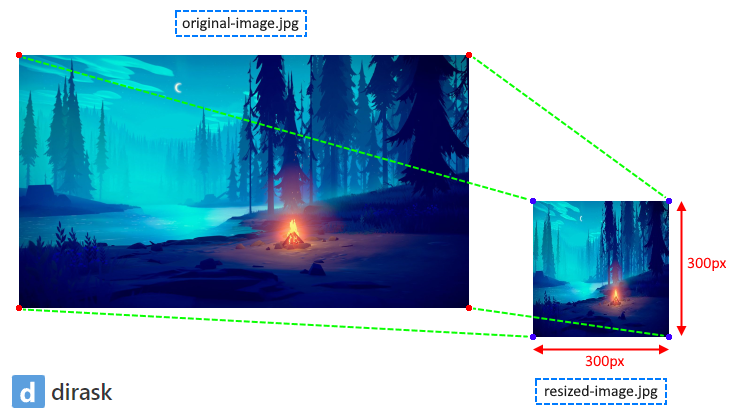
Program.java file:
package com.example;

import java.awt.image.BufferedImage;
import java.io.IOException;

public class Program {

	public static void main(String[] args) throws IOException {
		BufferedImage originalImage = JpegImageUtils.readImage("original-image.jpg");
		if (originalImage != null) {
			BufferedImage resizedImage = JpegImageUtils.resizeImage(originalImage, 300, 300);
			JpegImageUtils.writeImage(resizedImage, 0.75f, "resized-image.jpg");
		}
	}
}
Hint: in the above example JPEG quality is set to
0.75f(it should be in the range from0.0fto1.0f).
Common util
JpegImageUtils.java file:
package com.example;

import java.awt.Image;
import java.awt.Color;
import java.awt.Graphics;
import java.awt.image.BufferedImage;
import java.io.IOException;
import java.io.InputStream;
import java.io.FileInputStream;
import java.io.FileOutputStream;
import java.io.OutputStream;
import java.util.Iterator;
import javax.imageio.IIOImage;
import javax.imageio.ImageIO;
import javax.imageio.ImageWriter;
import javax.imageio.ImageWriteParam;
import javax.imageio.plugins.jpeg.JPEGImageWriteParam;
import javax.imageio.spi.IIORegistry;
import javax.imageio.spi.ImageWriterSpi;
import javax.imageio.spi.ServiceRegistry;
import javax.imageio.stream.MemoryCacheImageOutputStream;

public final class JpegImageUtils {

	// constants

	private static final ImageWriterSpi SPI;

	// constructors

	static {
		IIORegistry registry = IIORegistry.getDefaultInstance();
		ServiceRegistry.Filter filter = (Object object) -> {
			ImageWriterSpi spi = (ImageWriterSpi) object;
			for (String type : spi.getMIMETypes()) {
				if ("image/jpeg".equals(type)) {
					return true;
				}
			}
			return false;
		};
		Iterator<ImageWriterSpi> iterator = registry.getServiceProviders(ImageWriterSpi.class, filter, true);
		if (!iterator.hasNext()) {
			throw new RuntimeException("JPEG image writer is not supported.");
		}
		SPI = iterator.next();
	}

	private JpegImageUtils() {
		// Nothing here ...
	}

	// helper methods

	private static ImageWriteParam createParameter(float quality) {
		JPEGImageWriteParam parameter = new JPEGImageWriteParam(null);
		parameter.setCompressionMode(ImageWriteParam.MODE_EXPLICIT);
		parameter.setCompressionQuality(quality);
		return parameter;
	}

	private static ImageWriter createWriter(OutputStream stream) throws IOException {
		ImageWriter writer = SPI.createWriterInstance();
		try {
			writer.setOutput(new MemoryCacheImageOutputStream(stream));
		} catch (Throwable ex) {
			writer.dispose();
		}
		return writer;
	}

	// public methods

	// ------ readImage

	public static BufferedImage readImage(String path) throws IOException {
		try (FileInputStream stream = new FileInputStream(path)) {
			return ImageIO.read(stream);
		}
	}

	public static BufferedImage readImage(InputStream stream) throws IOException {
		return ImageIO.read(stream);
	}

	// ------ writeImage

	public static void writeImage(BufferedImage srcImage, float dstQuality, String dstPath) throws IOException {
		try (FileOutputStream dstStream = new FileOutputStream(dstPath)) {
			writeImage(srcImage, dstQuality, dstStream);
		}
	}

	public static void writeImage(BufferedImage srcImage, float dstQuality, OutputStream dstStream) throws IOException {
		IIOImage image = new IIOImage(srcImage, null, null);
		ImageWriteParam parameter = createParameter(dstQuality);
		ImageWriter writer = createWriter(dstStream);
		try {
			writer.write(null, image, parameter);
		} finally {
			writer.dispose();
		}
	}

	// ------ resizeImage

	public static BufferedImage resizeImage(BufferedImage srcImage, int dstWidth, int dstHeight) {
		return resizeImage(srcImage, dstWidth, dstHeight, Image.SCALE_AREA_AVERAGING);
	}

	public static BufferedImage resizeImage(BufferedImage srcImage, int dstWidth, int dstHeight, int dstHints) {
		BufferedImage image = new BufferedImage(dstWidth, dstHeight, BufferedImage.TYPE_INT_BGR);
		Graphics graphics = image.getGraphics();
		try {
			Image descriptor = srcImage.getScaledInstance(dstWidth, dstHeight, dstHints);
			graphics.drawImage(descriptor, 0, 0, Color.WHITE, null);
		} finally {
			graphics.dispose();
		}
		return image;
	}
}