EN
MySQL - SELECT IF example
0
points

In this article, we would like to show you SELECT statement with IF function in MySQL.
Quick solution:
UPDATE `table_name`
SET `column_name` = IF(condition , if_true, if_false);
Practical example
To show SELECT statement with IF function example, we will use the following users table:
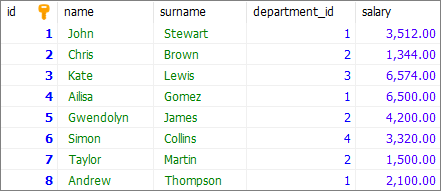
Note:
At the end of this article you can find database preparation SQL queries.
Example
In this example, we will use SELECT IF to display salary_info.
We select salary column, and if its value is > 4000 the IF function returns 'high_salary', otherwise it returns 'low_salary'.
Query:
SELECT `id`, `salary`,
    IF(`salary` > 4000, 'high_salary', 'low_salary') AS 'salary_info'
FROM `users`;
Output:
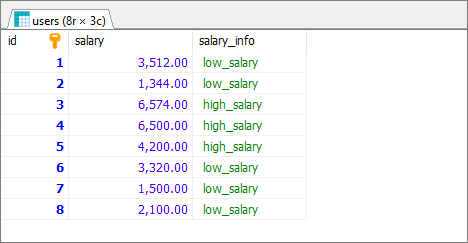
Note:
Go to this article to see more
IF()function practical examples.
Database preparation
create_tables.sql file:
CREATE TABLE `users` (
	`id` INT(10) UNSIGNED NOT NULL AUTO_INCREMENT,
	`name` VARCHAR(50) NOT NULL,
	`surname` VARCHAR(50) NOT NULL,
	`department_id` INT(10) UNSIGNED,
    `salary` DECIMAL(15,2) NOT NULL,
	PRIMARY KEY (`id`)
);
insert_data.sql file:
INSERT INTO `users`
	( `name`, `surname`, `department_id`, `salary`)
VALUES
	('John', 'Stewart', 1, '3512.00'),
	('Chris', 'Brown', 2, '1344.00'),
	('Kate', 'Lewis', 3, '6574.00'),
	('Ailisa', 'Gomez', 1, '6500.00'),
	('Gwendolyn', 'James', 2, '4200.00'),
	('Simon', 'Collins', 4, '3320.00'),
	('Taylor', 'Martin', 2, '1500.00'),
	('Andrew', 'Thompson', 1, '2100.00');