EN
apache2 - do not let to display website embedded in iframe
8
points

In this short article, we would like to show you simple apache2 configuration that do not let to display your website embedded in frame, iframe, embed and object elements on ther webpages.
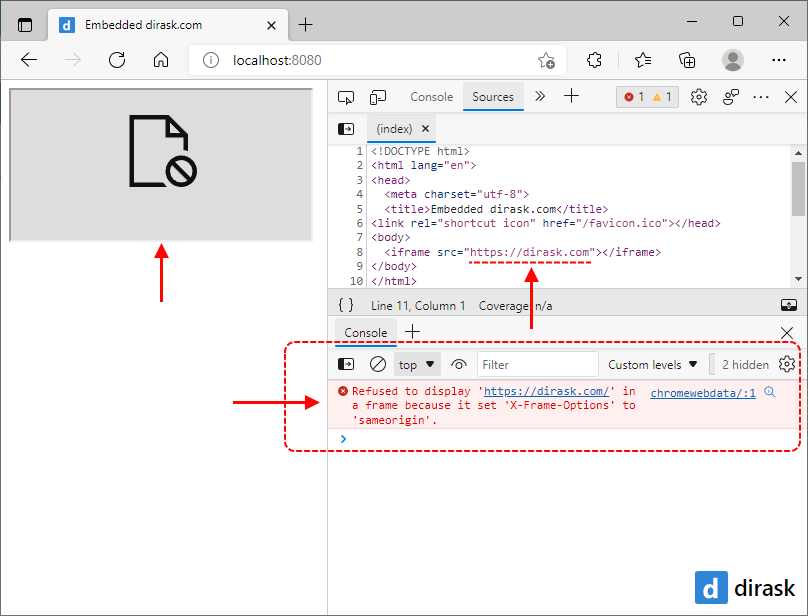
Hint: check if
mod_headersis enabled in your apache2 server or:1. execute in command line
a2enmod headerscommand to enablemod_headers,2. and later reastart apache2 server.
Solutions
The below solutions present example VirtualServer configurations.
1. Permanent block
Using this configuration we will be not able to built-in website in all iframe elements.
<VirtualHost *:443>

    ServerName my-domain.com

    <IfModule mod_headers.c>
        Header set X-Frame-Options: DENY
    </IfModule>

</VirtualHost>
2. The same origin allowed
Using this configuration we will be able to built-in website in onwn iframe element, but only if origin for both websites will be the same.
<VirtualHost *:443>

    ServerName my-domain.com

    <IfModule mod_headers.c>
        Header set X-Frame-Options: SAMEORIGIN
    </IfModule>

</VirtualHost>