Selenium java - How to solve selenium error SessionNotCreatedException: session not created: This version of ChromeDriver only supports Chrome version ?

How to solve selenium error SessionNotCreatedException: session not created: This version of ChromeDriver only supports Chrome version ?
Exception in thread "main" org.openqa.selenium.SessionNotCreatedException: session not created: This version of ChromeDriver only supports Chrome version 101
Part of stacktrace:
Only local connections are allowed.
Please see https://chromedriver.chromium.org/security-considerations for suggestions on keeping ChromeDriver safe.
ChromeDriver was started successfully.
Exception in thread "main" org.openqa.selenium.SessionNotCreatedException: session not created: This version of ChromeDriver only supports Chrome version 101
Current browser version is 100.0.4896.127 with binary path C:\Program Files\Google\Chrome\Application\chrome.exe
You have wrong version of the chrome driver. Chrome browser and chrome driver needs to have the same version.
Your current setup:
- You have chrome browser version: 100.0.4896.127
- Chrome driver: 101
Chrove driver needs to be in version: 100
Solution
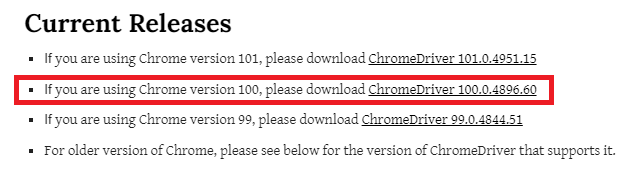
Download chrome driver in version 100.
Link:
Steps to download chrome driver:
1. Current Releases
2. If you use windows:
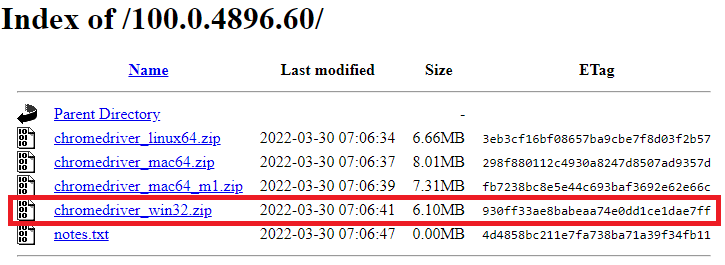
3. Download correct version of the chrome driver.
4. Unzip the package
5. Replace your local chrome.exe with this newly downloaded chrome driver.
In below example the path to the chrome driver is:
C:\\selenium_chrome_drivers\\chromedriver.exe
Example:
import org.openqa.selenium.By;
import org.openqa.selenium.WebDriver;
import org.openqa.selenium.WebElement;
import org.openqa.selenium.chrome.ChromeDriver;
import org.openqa.selenium.chrome.ChromeOptions;

public class Example {

    public static void main(String[] args) {
        ChromeOptions options = new ChromeOptions();
        options.addArguments("--window-size=1366,768");

        String chromeDriverPath = "C:\\selenium_chrome_drivers\\chromedriver.exe";
        System.setProperty("webdriver.chrome.driver", chromeDriverPath);
        WebDriver webDriver = new ChromeDriver(options);

        try {
            String filePath = "https://en.wikipedia.org/wiki/Java_(programming_language)";
            webDriver.get(filePath);

            WebElement element = webDriver.findElement(By.id("firstHeading"));
            System.out.println(element.getText()); // Java (programming language)
        } finally {
            webDriver.close();
            webDriver.quit();
        }
    }
}