Languages

Google Chrome - console.log and console.debug don't show message

3 points
Asked by:
starcraf35
754

I have the following problem when I try to use console.log() or console.debug() the messages don't show up in the developer tools.
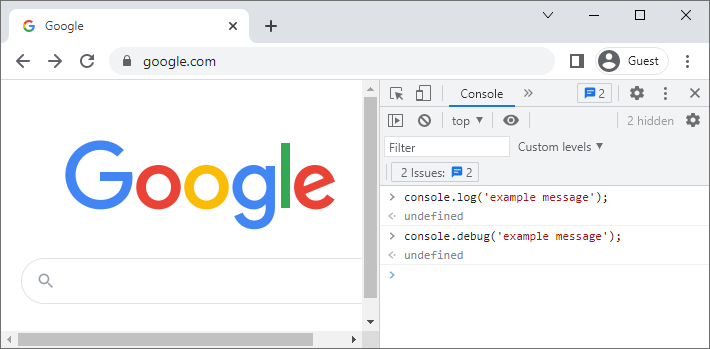
Google Chrome developer tools - console.log and console.debug don't work
1 answer
3 points
Answered by:
starcraf35
754

You've probably changed the Default levels of the logs. Click the Custom levels and make sure that "Info" is selected in the dropdown menu.
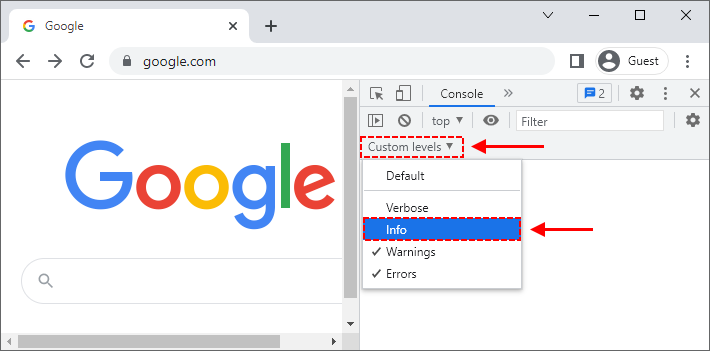
Google Chrome - enable console.log() and console.debug() messages

You can also check the article:

  1. Google Chrome - change default level of log using developer tools

0 comments Add comment
Donate to Dirask
Our content is created by volunteers - like Wikipedia. If you think, the things we do are good, donate us. Thanks!
Join to our subscribers to be up to date with content, news and offers.
Native Advertising
🚀
Get your tech brand or product in front of software developers.
For more information Contact us
Dirask - we help you to
solve coding problems.
Ask question.

❤️💻 🙂

Join