EN
Flexbox - how to set 100% height of each child inside component?
2
answers
6
points

I would like to fill container with children that have equal height and they are on the grid.
I have code:
// ONLINE-RUNNER:browser;

<html>
<head>
    <style>

        div {
            border: 1px solid red;
        }

        div.container {
            display: flex;
            flex-wrap: wrap;
            height: 100%; /* this causes vertical scrollbar to appear */
        }

        div.child {
            flex: 40%; /* <- how to remove 40% and use some other flex
            param to achieve the same result? */

            margin: 10px;
            padding: 10px;
        }

    </style>
</head>
<body>
<div class="container">
    <div class="child">1</div>
    <div class="child">2</div>
    <div class="child">3</div>
    <div class="child">4</div>
    <div class="child">5</div>
    <div class="child">6</div>
</div>
</body>
</html>
Result:
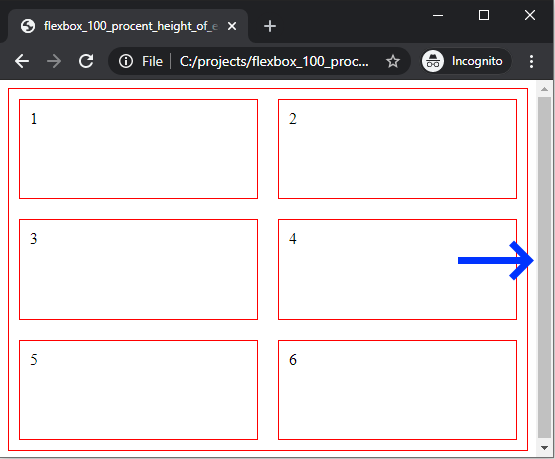
Questions:
1. How to remove vertical scrollbar? I don't want to set height to 99% :)
2. flex: 40% - How to remove flex: 40% and use some other flex param to achieve the same result?
2 answers
5
points
Grid box cound solve your problem too.
- How to remove vertical scrollbar? I don't want to set height to 99% :)
Ad. use correwct box model sizing:box-sizing: border-box;current approach - flex: 40% - How to remove flex: 40% and use some other flex param to achieve the same result?
Ad. That approach is good in your case, sometimes some programmers usecalc()function too.
Example solution:
// ONLINE-RUNNER:browser;

<html>
<head>
  <style>

	body {
		margin: 0;
      	height: 300px;
	}

	div {
		border: 1px solid red;
		box-sizing: border-box;
	}

	div.container {
		height: 100%;
		display: flex;
		flex-wrap: wrap;
	}

	div.child {
		margin: 10px;
		padding: 10px;
		flex: 40%; /* <-- helps to keep 2 child per row */
	}

  </style>
</head>
<body>
  <div class="container">
    <div class="child">1</div>
    <div class="child">2</div>
    <div class="child">3</div>
    <div class="child">4</div>
    <div class="child">5</div>
    <div class="child">6</div>
  </div>
</body>
</html>
0 comments
Add comment
5
points
Answers:
1. How to remove vertical scrollbar? I don't want to set height to 99% :)
Answer: add body with margin: -1px and overflow: hidden
2. flex: 40% - How to remove flex: 40% and use some other flex param to achieve the same result?
Answer: that is correct solution.
Solution:
// ONLINE-RUNNER:browser;

<html>
<head>
    <style>

        body {
            margin: 0;
          	height: 300px;
            overflow: hidden;
        }

        div {
            border: 1px solid red;
        }

        div.container {
            display: flex;
            flex-wrap: wrap;
            height: 100%; /* it is ok, take a look at body */
        }

        div.child {
            flex: 40%; /* it is ok */
            margin: 10px;
            padding: 10px;
        }

    </style>
</head>
<body>
<div class="container">
    <div class="child">1</div>
    <div class="child">2</div>
    <div class="child">3</div>
    <div class="child">4</div>
    <div class="child">5</div>
    <div class="child">6</div>
</div>
</body>
</html>
0 comments
Add comment