EN
Express.js - Error: listen EADDRINUSE: address already in use :::8080
2
answers
3
points

Working with Express.js application, suddenly I got the following error. Can you help me to fix this?
Stack trace:
node:events:491
      throw er; // Unhandled 'error' event
      ^

Error: listen EADDRINUSE: address already in use :::8080
    at Server.setupListenHandle [as _listen2] (node:net:1432:16)
    at listenInCluster (node:net:1480:12)
    at Server.listen (node:net:1568:7)
    at Function.listen (C:\Users\user\my-project\backend\node_modules\express\lib\application.js:635:24)
    at Object.<anonymous> (C:\Users\user\my-project\backend\index.js:75:5)
    at Module._compile (node:internal/modules/cjs/loader:1126:14)
    at Object.Module._extensions..js (node:internal/modules/cjs/loader:1180:10)
    at Module.load (node:internal/modules/cjs/loader:1004:32)
    at Function.Module._load (node:internal/modules/cjs/loader:839:12)
    at Function.executeUserEntryPoint [as runMain] (node:internal/modules/run_main:81:12)
Emitted 'error' event on Server instance at:
    at emitErrorNT (node:net:1459:8)
    at processTicksAndRejections (node:internal/process/task_queues:83:21) {
  code: 'EADDRINUSE',
  errno: -4091,
  syscall: 'listen',
  address: '::',
  port: 8080
}
2 answers
3
points
You probably have another process running on port :8080.
Quick solution for Windows:
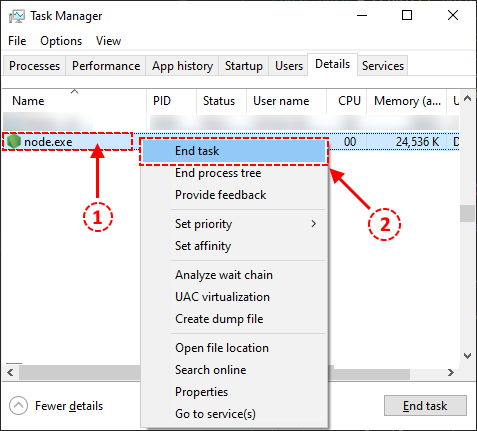
- open Task Manager -> Details,
- find
node.exe, right click to open menu and select End task.
0 comments
Add comment
2
points
You can use command line.
e.g.
C:\> netstat -ano | findstr :8080
  TCP    0.0.0.0:8080           0.0.0.0:0              LISTENING       8224
  TCP    [::]:8080              [::]:0                 LISTENING       8224

C:\> taskkill /PID 8224 /F
SUCCESS: The process with PID 8224 has been terminated.
See also
0 comments
Add comment