EN
Node.js - how to use .env
0
points

In this article, we would like to show you how to use .env in Node.js.
Introduction
The .env file is used to store environment variables. Environment variables are used to protect the sensitive data (like API keys) that shouldn't be visible directly in the code.
2. Setup dotenv and create .env file
To use environment variables, install dotenv package with the following command in the console:
npm install dotenv
Import dotenv in your project and use dotenv.config() to make it work.
const dotenv = require('dotenv');
dotenv.config();
The next step is to create .env file. Below you can see the example project structure.
/app/
  ├── node_modules/
  ├── .env
  ├── index.js
  ├── package-lock.json
  └── package.json
3. Set environment variables
There are two ways of setting the environment variables.
1. Directly in .env file:
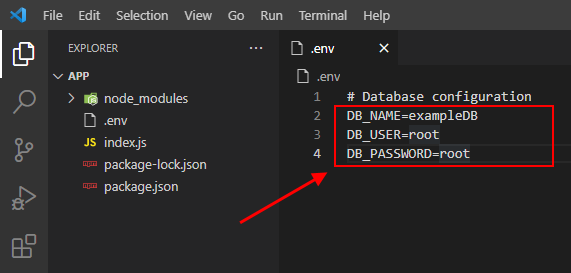
Note:
The
#in .env file is used for comments.
2. From the code:
const dotenv = require('dotenv');
dotenv.config();

// Set DB_NAME environment variable
process.env['DB_NAME'] = 'myDatabase';
4. Access environment variables
To access keys and values you defined in your .env file use the process.env.
Practical example:
const dotenv = require('dotenv');
dotenv.config();

// get database name from .env file
console.log(process.env.DB_NAME);
Output:
exampleDB