EN
MySQL - convert date to milliseconds
3
points

In this article, we would like to show you how to convert date to milliseconds in MySQL.
Quick solution
SELECT (UNIX_TIMESTAMP(`date_column_name`)*1000) AS 'alias_name'
FROM `table_name`;
Practical example
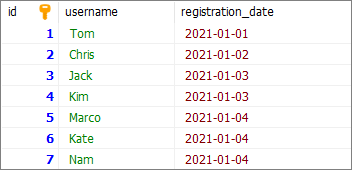
To show how to convert date to milliseconds, we will use the following table:
Note:
At the end of this article you can find database preparation SQL queries.
Example
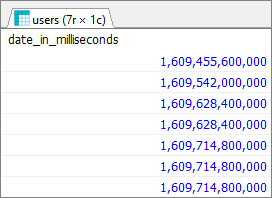
In this example, we will convert registration_date column from users table to milliseconds. To do so, we will use UNIX_TIMESTAMP() function, which returns date in seconds, then we'll multiply the result by 1000.
Query:
SELECT (UNIX_TIMESTAMP(`registration_date`)*1000) AS 'date_in_milliseconds'
FROM `users`;
Result:
Note:
Unix time is counted from January 1st 1970.
Database preparation
create_tables.sql file:
CREATE TABLE `users` (
	`id` INT(10) UNSIGNED NOT NULL AUTO_INCREMENT,
	`username` VARCHAR(50) NOT NULL,
	`registration_date` DATE NOT NULL,
	PRIMARY KEY (`id`)
);
insert_data.sql file:
INSERT INTO `users`
	(`username`, `registration_date`)
VALUES
	('Tom', '2021-01-01'),
	('Chris','2021-01-02'),
	('Jack','2021-01-03'),
    ('Kim','2021-01-03'),
    ('Marco','2021-01-04'),
	('Kate','2021-01-04'),
	('Nam','2021-01-04');