EN
Express.js - simple custom authentication example using MySQL database
8
points

In this article, we would like to show how to create a simple web application with custom authentication using Node.js, Express.js, and MySQL database.
Project repository: GitHub
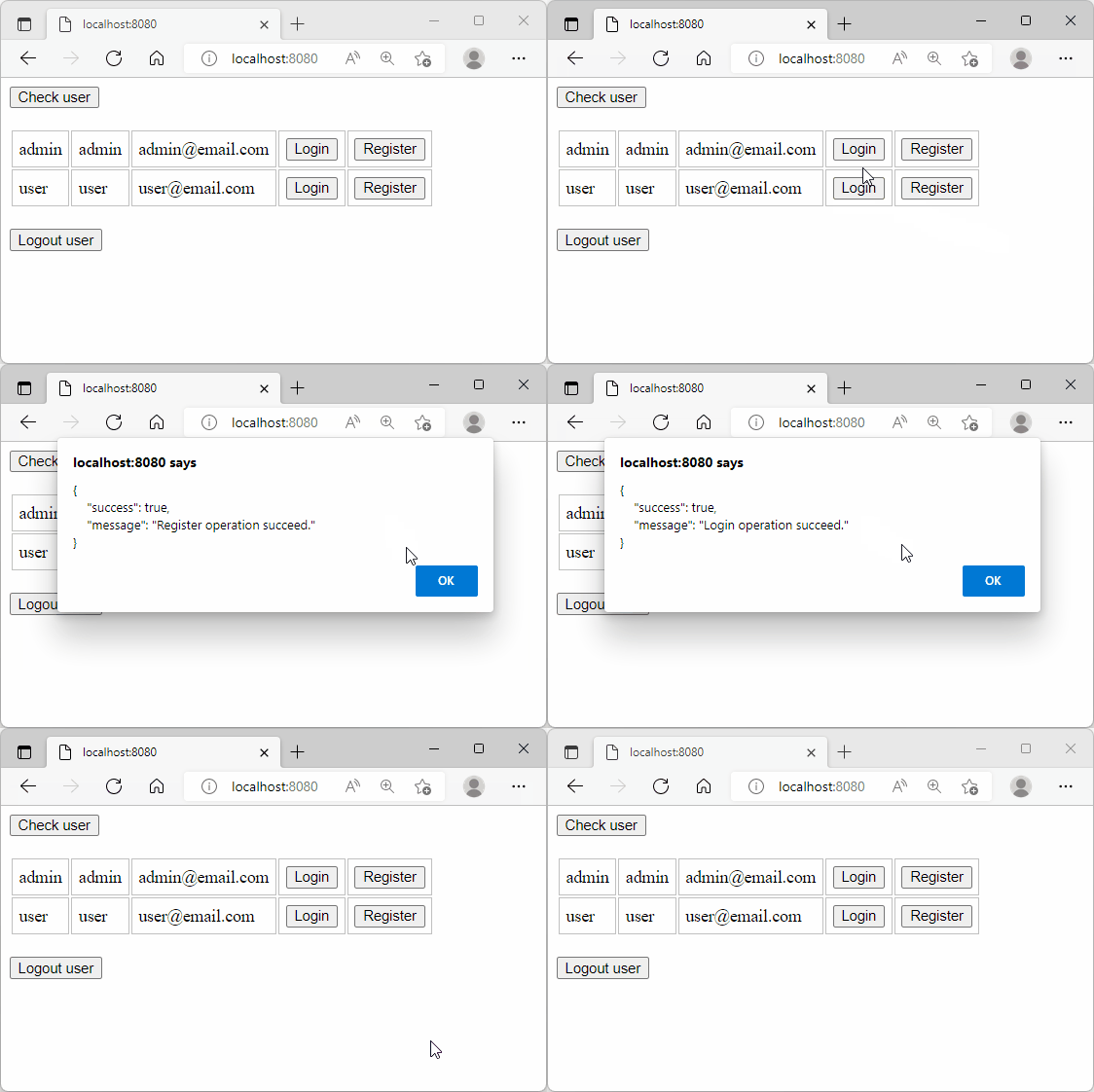
Final effect:
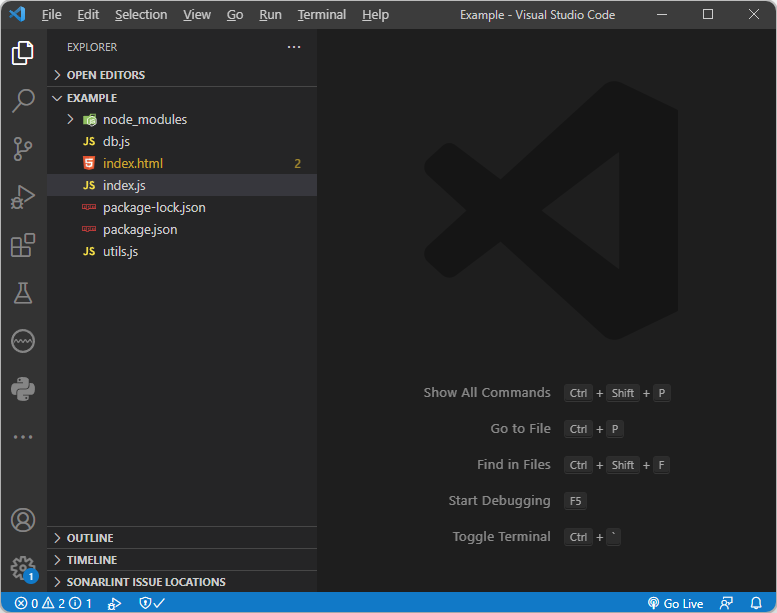
Project structure:
index.js file:
const path = require('path');
const express = require('express');
const session = require('express-session');
const parser = require('body-parser');

const utils = require('./utils');
const db = require('./db');

// configuration

const app = express();

app.use(
    session({
        name: 'SESSION_ID',         // cookie name stored in the web browser
        secret: 'my_secret',        // it is good to use random string here to protect session
        cookie: {
            maxAge: 30 * 86400000,  // 30 * (24 * 60 * 60 * 1000) = 30 * 86400000 => session is stored 30 days
        }
    })
);

app.use(parser.json());

// routes

app.get('/', (request, response) => {
    response.sendFile(path.join(__dirname, 'index.html'));
});

app.post('/api/user/check', (request, response) => {
    const session = request.session;
    if (session.LOGGED_USER_ID == null) {
        utils.sendError(response, 'Currently, You are not logged in.');
    } else {
        db.fetchUser(session.LOGGED_USER_ID, (error, data) => {
            if (error) {
                utils.logError(error);
                utils.sendError(response, 'Check operation failed (Server internal error).');
            } else {
                if (data.length > 0) {
                    const entry = data[0];
                    response.json({
                        success: true,
                        message: 'Currently, You are logged in.',
                        user: {
                            id: entry.id,
                            username: entry.username,
                         /* password: entry.password, */
                            email: entry.email
                        }
                    });
                } else {
                    delete session.LOGGED_USER_ID;
                    utils.sendError(response, 'Currently, You are not logged in.');
                }
            }
        });
    }
});

app.post('/api/user/login', (request, response) => {
    const session = request.session;
    if (session.LOGGED_USER_ID == null) {
        const payload = request.body;
        db.checkUser(payload.username, payload.password, (error, data) => {
            if (error) {
                utils.logError(error);
                utils.sendError(response, 'Login operation failed (Server internal error).');
            } else {
                if (data.length > 0) {
                    const entry = data[0];
                    session.LOGGED_USER_ID = entry.id;
                    utils.sendSuccess(response, 'Login operation succeed.');
                } else {
                    utils.sendError(response, 'Login operation failed (Incorrect user credentials).');
                }
            }
        });
    } else {
        utils.sendError(response, 'Login operation failed (You are already logged in).');
    }
});

app.post('/api/user/logout', (request, response) => {
    const session = request.session;
    if (session.LOGGED_USER_ID == null) {
        utils.sendError(response, 'Currently, You are not logged in.');
    } else {
        delete session.LOGGED_USER_ID;
        utils.sendSuccess(response, 'Logout operation succeed.');
    }
});

app.post('/api/user/register', (request, response) => {
    const payload = request.body;
    db.insertUser(payload, (error, data) => {
        if (error) {
            if (error.code === 'ER_DUP_ENTRY') {
                utils.sendError(response, 'Register operation failed (User already exists).');
            } else {
                utils.logError(error);
                utils.sendError(response, 'Register operation failed (Server internal error).');
            }
        } else {
            if (data.affectedRows > 0) {
                session.LOGGED_USER_ID = data.insertId;
                utils.sendSuccess(response, 'Register operation succeed.');
            } else {
                utils.sendError(response, 'Register operation failed (User creation problem).');
            }
        }
    });
});

app.listen(8080, () => console.log('Server is listening on port 8080.'));
db.js file:
const mysql = require('mysql');

const db = mysql.createPool({
    debug: false,
    host: 'localhost',    // '127.0.0.1'
    user: 'root',         // use your username !!!
    password: 'root',     // use your password !!!
    database: 'demo_db',
    connectionLimit: 10
});

const fetchUser = (id, callback) => {
    const query = 'SELECT `id`, `username`, `password`, `email` FROM `users` WHERE `id`=? LIMIT 1';
    const values = [id];
    db.query(query, values, callback);
};

const checkUser = (username, password, callback) => {
    // Note: do not store plain passwords, e.g. you can use https://github.com/kelektiv/node.bcrypt.js
    const query = 'SELECT `id` FROM `users` WHERE `username`=? AND `password`=? LIMIT 1';
    const values = [username, password];
    db.query(query, values, callback);
};

const insertUser = (data, callback) => {
    // Note: do not store plain passwords, e.g. you can use https://github.com/kelektiv/node.bcrypt.js
    const query = 'INSERT INTO `users` (`username`, `password`, `email`) VALUES (?, ?, ?)';
    const values = [data.username, data.password, data.email];
    db.query(query, values, callback);
};

module.exports = {
    fetchUser,
    checkUser,
    insertUser
};
utils.js file:
const logError = (error) => {
    console.error(error);
};

const sendSuccess = (response, message) => {
    response.json({
        success: true,
        message
    });
};

const sendError = (response, message) => {
    response.json({
        success: false,
        message
    });
};

module.exports = {
    logError,
    sendSuccess,
    sendError
};
index.html file:
<!doctype html>
<html>
<head>
  <style>

    th {
        padding: 6px;
    }

    td {
        padding: 6px;
        border: 1px solid silver;
    }

  </style>
</head>
<body>
  <button onclick="checkUser()">Check user</button>
  <br /><br />
  <table>
    <tr>
      <th>Username</th>
      <th>Password</th>
      <th>E-mail</th>
      <th colspan="2"></th>
    </tr>
    <tr>
      <td>admin</td>
      <td>admin</td>
      <td>admin@email.com</td>
      <td><button onclick="loginUser('admin', 'admin')">Login</button></td>
      <td><button onclick="registerUser('admin', 'admin', 'admin@email.com')">Register</button></td>
    </tr>
    <tr>
      <td>user</td>
      <td>user</td>
      <td>user@email.com</td>
      <td><button onclick="loginUser('user', 'user')">Login</button></td>
      <td><button onclick="registerUser('user', 'user', 'user@email.com')">Register</button></td>
    </tr>
  </table>
  <br />
  <button onclick="logoutUser()">Logout user</button>
  <script>

      // Reusable logic:

      const sendData = async (requestUrl, requestData) => {
          const config = {
              method: 'POST',
              headers: {
                  'Accept': 'application/json',
                  'Content-Type': 'application/json'
              }
          };
          if (requestData) {
              config.body = JSON.stringify(requestData); // request body
          }
          const response = await fetch(requestUrl, config);
          return await response.json();
      };


      // Example actions:

      const checkUser = async () => {
          const responseData = await sendData('/api/user/check');
          alert(JSON.stringify(responseData, null, 4));
      };

      const loginUser = async (username, password) => {
          const requestData = {username, password};
          const responseData = await sendData('/api/user/login', requestData);
          alert(JSON.stringify(responseData, null, 4));
      };

      const logoutUser = async () => {
          const responseData = await sendData('/api/user/logout');
          alert(JSON.stringify(responseData, null, 4));
      };

      const registerUser = async (username, password, email) => {
          const requestData = {username, password, email};
          const responseData = await sendData('/api/user/register', requestData);
          alert(JSON.stringify(responseData, null, 4));
      };

  </script>
</body>
</html>
package.js file:
{
    "name": "demo",
    "version": "1.0.0",
    "description": "",
    "main": "index.js",
    "author": "Dirask",
    "dependencies": {
        "mysql": "^2.18.1",
        "express": "^4.18.2",
        "express-session": "^1.17.3"
    }
}
Database preparation
create_database.sql file:
CREATE DATABASE `demo_db`;

CREATE TABLE `users` (
	`id` BIGINT(20) NOT NULL AUTO_INCREMENT,
	`username` VARCHAR(255) NOT NULL,
	`password` VARCHAR(255) NOT NULL,
	`email` VARCHAR(255) NOT NULL,
	PRIMARY KEY (`id`) USING BTREE,
	UNIQUE INDEX `UK_username` (`username`) USING BTREE,
	UNIQUE INDEX `UK_email` (`email`) USING BTREE
);