EN
CSS - specify text horizontal alignment
0
points

In this article, we would like to show you how to specify text horizontal alignment with CSS.
Quick solution:
div {
    text-align: center;  /*  or: left | right | justify  */
}
Text alignment
By setting the text-align property we are able to align the inline content inside the element.
| Preview | Style |
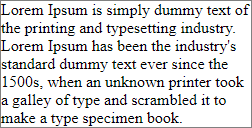 |
|
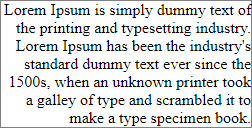 |
|
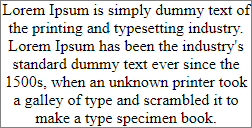 | text-align: center |
 | text-align: justify |
Practical example
In this section, we present various text alignments in the following order: left, right, center, justify.
// ONLINE-RUNNER:browser;

<!doctype html>
<html>
<head>
  <style>

    div {
        border: 1px solid gray;
        max-width: 230px;
    }

  </style>
</head>
<body>
  <p>left or start (default):</p>
  <div style="text-align: left">Lorem Ipsum is simply dummy text of the printing and typesetting industry. Lorem Ipsum has been the industry's standard dummy text ever since the 1500s, when an unknown printer took a galley of type and scrambled it to make a type specimen book.</div>
  <p>right or end:</p>
  <div style="text-align: right">Lorem Ipsum is simply dummy text of the printing and typesetting industry. Lorem Ipsum has been the industry's standard dummy text ever since the 1500s, when an unknown printer took a galley of type and scrambled it to make a type specimen book.</div>
  <p>center:</p>
  <div style="text-align: center">Lorem Ipsum is simply dummy text of the printing and typesetting industry. Lorem Ipsum has been the industry's standard dummy text ever since the 1500s, when an unknown printer took a galley of type and scrambled it to make a type specimen book.</div>
  <p>justify:</p>
  <div style="text-align: justify">Lorem Ipsum is simply dummy text of the printing and typesetting industry. Lorem Ipsum has been the industry's standard dummy text ever since the 1500s, when an unknown printer took a galley of type and scrambled it to make a type specimen book.</div>
</body>
</html>